PYC STUDIOS | Studio Update

“” HOW TO BOOK A CLASS  “”

If you haven’t yet used Momence, our booking and video platform, watch this quick intro  video  for all the info.  

To book a class, head to  the PYC web app on your phone or to  our website  as usual. This will automatically direct you to our booking system.

 Livestream links will come from Momence so it’s a great idea to add the Momence email to your approved contacts list.  You will also be able to access your livestream classes straight from your account.

“”  HOW TO JOIN A LIVESTREAM CLASS  “”

“”  PYC WEB APP  “”

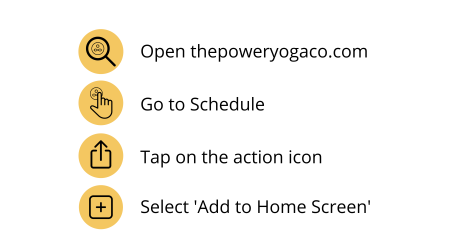
Add the PYC web app  to  your  phone and you’ll have all the benefits of both the website and an  app  at the touch of a button.  And it doesn’t take up any space on your device!  It’s simple to use  and makes booking your  classes a breeze. If you haven’t set it up already, follow these 4 simple steps to add it to your phone:

icons

“”  AIR PURIFYING MACHINE  “”

To give you peace of mind while practicing we have installed an award-winning air purifier in the studio. ‘Breathe’  kills up to 99.9% of Covid-19 along with other viruses, bacteria, mould & pollen.

We run the device throughout each class, helping to keep us all safe while practicing together, and  it’s so quiet  that you won’t even notice it.

If you would like to find out more about Breathe, you can read  more about it  here.